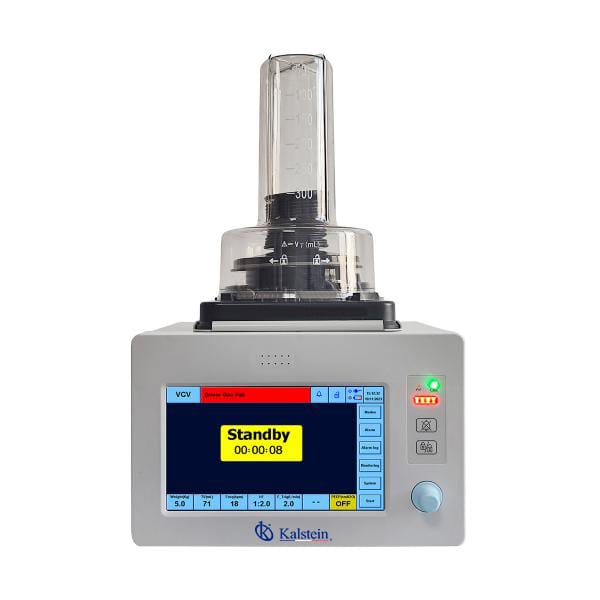
Common Errors and Troubleshooting by Symptoms for the YR06104 Veterinary Anesthesia Ventilator
The YR06104 Veterinary Anesthesia Ventilator is a versatile tool designed for various surgical scenarios in animals, widely utilized in pet hospitals, animal clinics, research institutions, and training facilities. However, like any complex medical device, it can encounter operational issues. This article focuses on common errors and troubleshooting by symptoms related to the YR06104 model, providing practical solutions to ensure optimal performance.
Overview of the YR06104 Veterinary Anesthesia Ventilator
The YR06104 model utilizes a turbo-driven design, eliminating the need for a high-pressure air source, making it a convenient choice for veterinary practices. The machine calculates ventilation parameters automatically by adjusting only the weight of the animal, allowing for ease of use. With multiple breathing modes, including VCV, PCV, and SPONT, it meets various clinical requirements effectively.
Technical Specifications of the YR06104
| Specification | Details |
|---|---|
| Model | YR06104 |
| Tidal Volume (TV) | 20-1500 ml |
| Breathing Rate (Freq) | 1-150 bpm |
| Spontaneous Breathing Rate (Freq_Spont) | 0-150 lpm |
| Inhalation to Exhalation Ratio (I:E) | 9.9:1 to 1:9 adjustable |
| Oxygen Concentration (FiO2) | 15-100% |
| Pressure Trigger Sensitivity (P_Tring) | -1 to 20 cmH2O, OFF |
| Flow Trigger Sensitivity (F_Tring) | 0.5-20 L/min, OFF |
| Mean Pressure (Pmean) | 0-80 cmH2O |
| Weight (Gross) | 12 kg |
| Package Dimensions | 38 x 33 x 50 cm |
Troubleshooting by Symptoms
Understanding the symptoms of potential errors is essential for effective troubleshooting. The following sections will discuss various common symptoms you might encounter while operating the YR06104 and how to address them.
Equipment Does Not Power On
If the YR06104 fails to power on, check the following:
- Ensure the power cable is securely connected and the outlet is functional.
- Look for any blown fuses or tripped circuit breakers.
- Inspect the power button to confirm it is not stuck.
Common Fixes:
- Replace the fuse or reset the circuit breaker as needed.
- Try connecting to a different power outlet.
Error Code E-03
Error code E-03 may indicate a malfunction with the pressure sensor. Possible causes include:
- Sensor obstruction due to dust or debris.
- Faulty pressure sensor.
Common Fixes:
- Clean the sensor area gently with a soft cloth.
- If the error persists, replace the pressure sensor.
Inconsistent Readings
If the ventilator displays inconsistent readings, consider the following factors:
- Improper connection of the ventilator to the patient.
- Leakage in the breathing circuit.
Common Fixes:
- Check all connections and ensure the ventilator is appropriately attached to the patient.
- Inspect the breathing circuit for any signs of damage or leakage.
Symptom to Cause and Solution Matrix
| Symptom | Possible Cause | Solution |
|---|---|---|
| Equipment Does Not Power On | Power cable issue | Check connections and replace the fuse |
| Error Code E-03 | Pressure sensor malfunction | Clean sensor, replace if necessary |
| Inconsistent Readings | Patient connection issue | Check connections and inspect circuit |
Frequently Asked Questions
What are the common symptoms that indicate issues with the YR06104 ventilator?
Common symptoms include the equipment not powering on, error codes such as E-03, and inconsistent readings during operation. Each of these may have specific troubleshooting steps that can help resolve the issue.
How can I troubleshoot error code E-03 on the YR06104?
Error code E-03 typically indicates a malfunction with the pressure sensor. Cleaning the sensor area and checking for obstruction can often resolve this issue. If the error persists, replacing the pressure sensor may be required.
What should I do if the YR06104 displays inconsistent readings?
Inconsistent readings may result from improper patient connection or leakage in the breathing circuit. Ensure that all connections are secure and inspect the equipment for any leaks to rectify this issue.
How often should I perform maintenance on the YR06104 ventilator?
Regular maintenance is crucial for the performance of the YR06104. It is recommended to conduct checks before and after each use, with more thorough inspections and servicing done at least annually or as indicated by specific use conditions.
Are there any specific spare parts I need to replace regularly for the YR06104?
Common spare parts include filters and sensors that may require periodic replacement depending on usage frequency. It is advisable to keep a stock of critical components for timely replacements.
Can I use the YR06104 in outdoor environments?
The YR06104 is designed for indoor clinical settings. Using it in outdoor environments can expose it to conditions that may affect its performance and accuracy. It's best to maintain its use in controlled environments.
Where can I request a quote for the YR06104 Veterinary Anesthesia Ventilator?
You can request a quote on Kalstein Plus by contacting our sales team for detailed pricing and availability information.
If you are looking for a fusion of innovation and quality, you have come to the right place. At Kalstein, we offer you the luxury of exploring our exclusive catalog of laboratory equipment. We manufacture every device to the highest standards of excellence. Our intuitive and seamless online purchasing channels are designed for your convenience, securing the most competitive prices. Hesitate no longer — we bring science to life, it is time to become part of our community.