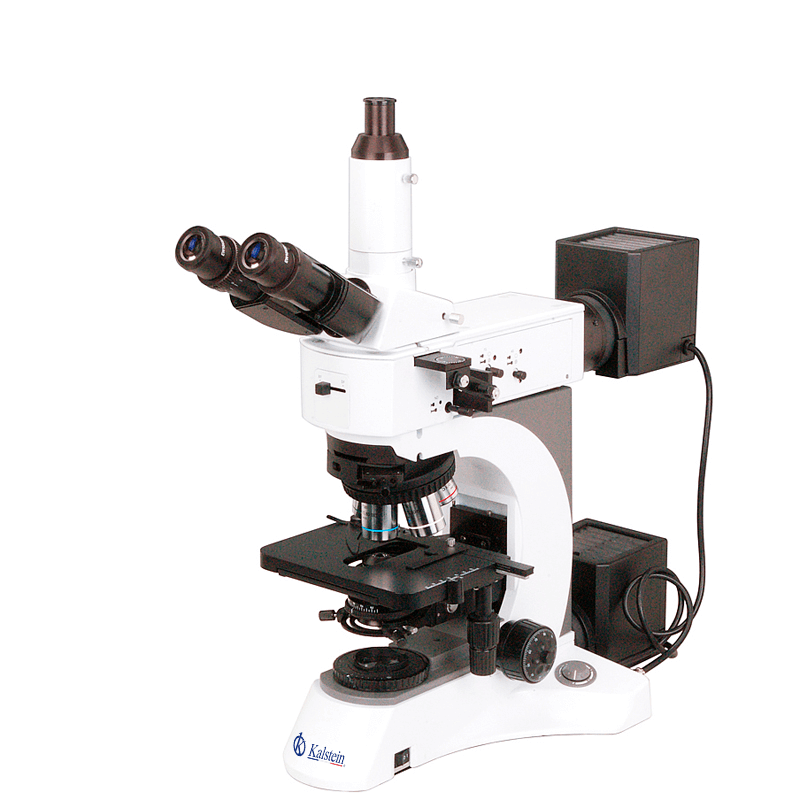
Common Errors and Troubleshooting by Symptoms for the YR0255 Microscope
The YR0255 microscope is a versatile instrument designed for industrial inspection and scientific research laboratories. However, like any sophisticated equipment, it may encounter various issues over time. This article focuses on the frequent errors that users may experience, organized by symptoms, providing comprehensive troubleshooting steps for effective resolution.
Technical Specifications of YR0255 Microscope
| Specification | Details |
|---|---|
| Model | YR0255 |
| Standard Function | BF-DF |
| Upgrade Function | BF-DF-PL-DIC |
| Optical System | Plan Infinity |
| Type of Head | Trinocular Seidentopf |
| Inclination of Head | 30° |
| Head Rotation | 360° |
| Interpupillary Distance | 40~75mm |
| Diopter Adjustment | Adjustable Left Tube |
| Main Light Path | E50 : P50 |
| Eyepiece Diameter | 30.0 mm |
| Objective Type | Infinity Plan Dark Field Metallurgical |
| Working Stage Size | ≥ 140 x 180 mm |
| Stage Type | 2 Mechanical Layers |
| Focus Type | Coaxial Coarse and Fine |
| Light Source Type | Halogen |
| Power Supply Type | AC 110V-240V |
Troubleshooting Symptoms for YR0255 Microscope
1. Equipment Does Not Power On
This is one of the most common issues that users face with the YR0255 microscope. Here are potential causes and solutions:
| Symptom | Possible Causes | Solutions |
|---|---|---|
| Equipment does not power on |
|
|
2. Inconsistent Readings
Inconsistent readings can arise from various factors. The following are common causes and remedies:
| Symptom | Possible Causes | Solutions |
|---|---|---|
| Inconsistent readings |
|
|
3. Error Code E-03 Displayed
Error codes can be critical in identifying issues with the YR0255 microscope. The error code E-03 can indicate specific malfunctions:
| Symptom | Possible Causes | Solutions |
|---|---|---|
| Error Code E-03 |
|
|
4. Image Distortion
If the images produced by the YR0255 microscope appear distorted, identifying the root cause is essential:
| Symptom | Possible Causes | Solutions |
|---|---|---|
| Image distortion |
|
|
5. Stage Movement Issues
Problems with stage movement can hinder effective operation. Addressing these issues involves understanding potential causes:
| Symptom | Possible Causes | Solutions |
|---|---|---|
| Stage does not move |
|
|
Frequently Asked Questions
What should I do if my YR0255 microscope shows an error code?
If your YR0255 microscope displays an error code, refer to the user manual for specific diagnostic instructions. Each error code corresponds to a potential issue, and following the troubleshooting steps can help resolve it efficiently.
How can I maintain my YR0255 microscope for optimal performance?
Regular maintenance involves cleaning optical components, checking calibration, and ensuring the mechanical parts are functioning smoothly. Keeping the microscope in a stable, clean environment also contributes to its longevity.
Are there specific compatibility requirements for accessories with the YR0255 microscope?
Yes, ensure that all accessories including objectives, eyepieces, and light sources are specifically designed for the YR0255 model to ensure compatibility and optimal performance.
What steps should I follow for the initial calibration of the YR0255 microscope?
For initial calibration, start by ensuring all components are correctly assembled. Then, utilize calibration slides and adjust the focus and alignment according to the manufacturer's guidelines before performing actual observations.
What are common mistakes to avoid when using the YR0255 microscope?
Common mistakes include improper sample placement, neglecting lens cleaning, and incorrect focus adjustment. Being mindful of these aspects can facilitate a smoother operation and accurate results.
How do I address image quality issues with the YR0255 microscope?
Image quality issues can often be remedied by cleaning optical components, adjusting light intensity, and ensuring proper calibration. If problems persist, checking for alignment of optical parts is advisable.
Request a Quote
If you are interested in purchasing the YR0255 or require more information, please request a quote for competitive pricing and additional details.
If you are looking for a fusion of innovation and quality, you have come to the right place. At Kalstein, we offer you the luxury of exploring our exclusive catalog of laboratory equipment. We manufacture every device to the highest standards of excellence. Our intuitive and seamless online purchasing channels are designed for your convenience, securing the most competitive prices. Hesitate no longer — we bring science to life, it is time to become part of our community.