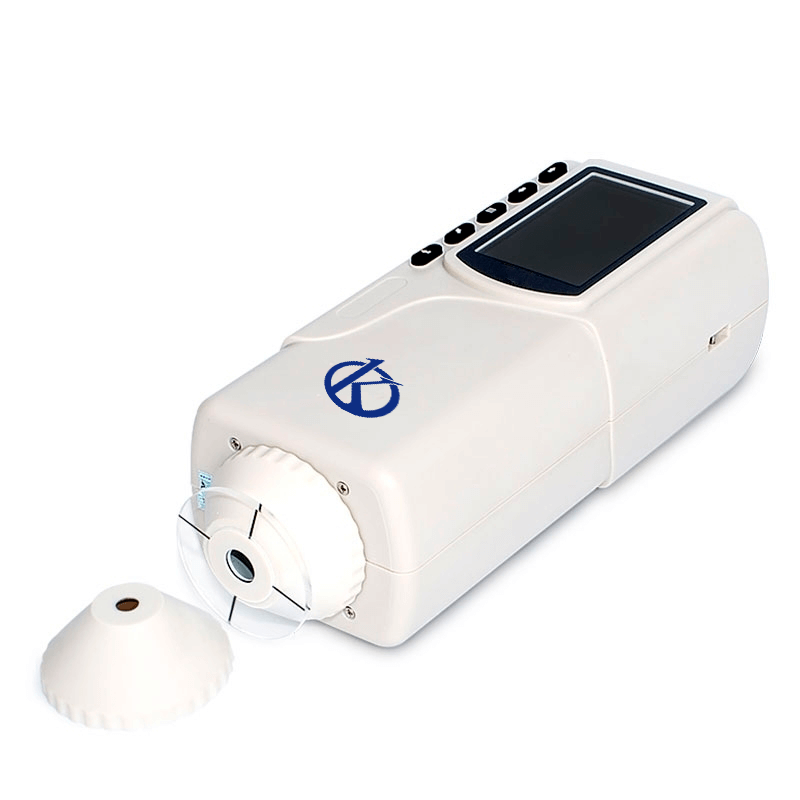
Common Errors and Troubleshooting Symptoms of the YR05512 Colorimeter
The YR05512 Colorimeter is designed for high precision in color measurements, making it an essential tool in various industries such as plastics, textiles, and food science. However, like any technical equipment, it may encounter operational issues that require troubleshooting. Understanding common errors and their remedies can significantly enhance the user experience and minimize downtime. This article is dedicated to identifying frequent symptoms and providing detailed troubleshooting steps tailored specifically for the YR05512 model.
Technical Specifications of YR05512
| Model | YR05512 |
|---|---|
| Illuminating/View Geometry | 8/dia |
| Measurement Aperture | Φ4mm |
| Detector | Silicon photodiode |
| Localization | Illuminated localization/cross localization |
| Measurement End Face | Large stable end and small concave-convex end |
| Color Space | CIEL*a*b*C*h*, CIEXYZ |
| Color Difference Formula | △E*ab, △L*a*b*, △E*C*h* |
| Light Source | D65 |
| Light Source Device | LED blue light excitation |
| Error Between Each Device | ≤0.80ΔE*ab |
| Storage | 100pcs standards, 20000pcs samples |
| Repeatability | Standard deviation within ΔE*ab 0.08 |
| Language | English/Chinese |
| Weight | 450g |
| Dimensions | 205×67×80mm |
| Power Supply | Rechargeable lithium-ion battery 3.7V 3200 mAh |
| Lamp Lifespan | 5 years, over 1.6 million measurements |
| Charging Time | 8 hours: 100% electricity |
| PC Software | CQCS3 Software |
| Printer (Optional) | Mini thermal printer |
Troubleshooting by Symptom
In this section, we will systematically outline common symptoms encountered with the YR05512 Colorimeter and provide actionable solutions for each issue.
Equipment Does Not Power On
This issue could stem from several factors, including battery depletion, faulty connections, or internal malfunction.
- Probable Cause: Battery is discharged.
- Diagnostic Steps: Check battery charge; replace if necessary.
- Solution: Ensure the device is fully charged before use.
Error Code E-03
Error code E-03 generally indicates a malfunction in the measurement process.
- Probable Cause: Improper calibration or sample placement.
- Diagnostic Steps: Recalibrate the device and ensure the sample is correctly positioned.
- Solution: Follow the calibration instructions in the manual closely.
Inconsistent Readings
Inconsistent readings can be caused by several factors including environmental conditions or sample inconsistency.
- Probable Cause: Environmental light interference or sample contamination.
- Diagnostic Steps: Check for external light sources; clean the measurement area.
- Solution: Conduct measurements in a controlled environment with standardized samples.
Symptom-Solution Matrix
| Symptom | Probable Cause | Solution |
|---|---|---|
| Equipment does not power on | Battery discharged | Fully charge the battery before use |
| Error code E-03 | Improper calibration | Recalibrate according to manual instructions |
| Inconsistent readings | Environmental light interference | Control the measurement environment |
Common User Errors and How to Avoid Them
Operators may inadvertently make mistakes that lead to inaccuracies. This section outlines these errors and suggests best practices for avoiding them.
- Skipping Calibration: Always calibrate before the first use and regularly according to measurements taken.
- Poor Sample Preparation: Ensure samples are clean and free from residues that might affect the readings.
- Ignoring Environmental Conditions: Conduct measurements in a stable environment free from drafts, direct sunlight, or vibrations.
Frequently Asked Questions
What should I do if my YR05512 Colorimeter displays an error code?
If your YR05512 Colorimeter shows an error code, refer to the user manual for specific troubleshooting steps pertaining to that code. Common fixes involve recalibration or ensuring the sample is properly placed.
How do I maintain my YR05512 Colorimeter?
Regular maintenance includes cleaning the measurement area, ensuring the device is charged, and recalibrating before significant use. Following these steps will prolong the lifespan of the equipment.
Can I use the YR05512 Colorimeter in different environments?
The YR05512 Colorimeter can be used in various environments but should be kept away from extreme temperatures, humidity, and direct sunlight to ensure accurate readings.
How often should I calibrate the YR05512?
Calibration frequency can depend on usage; however, it is recommended to calibrate the device before each session of use to ensure precision in measurements.
What type of samples can be measured with the YR05512 Colorimeter?
The YR05512 is capable of measuring a wide range of samples, including paints, textiles, plastics, and food products. Ensure that samples are prepared to specifications for optimal results.
Is there a warranty for the YR05512 Colorimeter?
The YR05512 Colorimeter typically comes with a warranty that covers manufacturing defects. Refer to your purchase documentation for specific warranty terms and duration.
If you are looking for a fusion of innovation and quality, you have come to the right place. At Kalstein, we offer you the luxury of exploring our exclusive catalog of laboratory equipment. We manufacture every device to the highest standards of excellence. Our intuitive and seamless online purchasing channels are designed for your convenience, securing the most competitive prices. Hesitate no longer — we bring science to life, it is time to become part of our community.