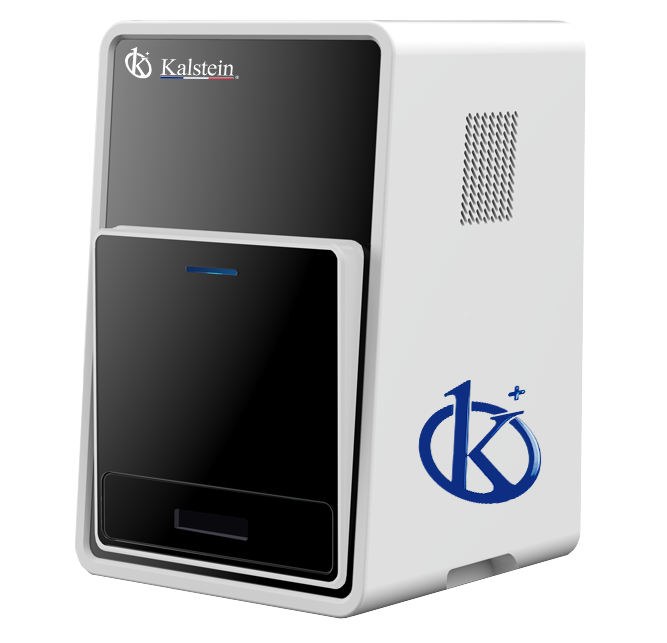
Common Errors and Troubleshooting for the YR06066 Chemiluminescence Imager
The YR06066 Chemiluminescence Imager is a powerful and compact solution designed for precise imaging in laboratory settings. However, like any sophisticated technology, users may encounter a range of common errors and issues that can impede functionality. This article focuses on troubleshooting techniques aimed at identifying symptoms, understanding probable causes, and offering solutions to maximize the performance of your YR06066.
Understanding the YR06066 Chemiluminescence Imager
The YR06066 is designed for chemiluminescence applications, particularly in Western blotting with enhanced chemiluminescence (ECL). Its features include a cooled digital CCD camera and advanced software options, offering high-resolution imaging capabilities that are critical for accurate protein detection and quantification.
Technical Data Table for YR06066
| Model | YR06066 (Current) |
|---|---|
| Digital Camera | Cooled CCD Camera |
| Physical Resolution | 6 Megapixels, 2750*2200 |
| Pixel Density and A/D | 16 bits |
| Gray Scales | 65536 |
| Dynamic Range | ≥4.6OD |
| Cooling Temperature | -60℃ ambient, -30℃ regulated |
| Scientific Lens | Ultra-sensitive F0.8 objective |
| Image Acquisition Software | No dongle required, unlimited users, free updates |
| Image Analysis Software | No dongle required, unlimited users, free updates |
Troubleshooting Common Issues with the YR06066
Equipment Does Not Power On
One of the most frustrating issues users may face is when the YR06066 fails to power on. Here are some probable causes and solutions:
- Power Supply Issues: Check if the power cable is securely connected. Verify that the power outlet is functioning properly by testing it with another device.
- Fuse Problems: Inspect the internal fuse to determine if it has blown and replace it if necessary.
- Internal Hardware Failure: If all else fails, there may be an internal hardware issue that requires technical service.
Error Code E-03
Error code E-03 can be indicative of several issues. Here’s how to diagnose:
- Camera Connection: Ensure that the camera is properly connected and recognized by the software.
- Software Malfunction: Restart the imaging software and try again. Update the software if updates are available.
- Hardware Inspection: Consider a hardware inspection to ensure no physical damage has occurred.
Inconsistent Readings
Inconsistent data can lead to significant problems during experiments. Troubleshooting can help achieve reliable results:
- Calibration Issues: Ensure that the device is calibrated correctly before taking readings.
- Environmental Factors: Check if temperature and humidity levels are within the recommended range for optimal performance.
- Reagent Quality: Use high-quality reagents that are compatible with the YR06066 to avoid variability.
Symptom-Cause-Solution Matrix
| Symptom | Probable Cause | Solution |
|---|---|---|
| Equipment Does Not Power On | Power supply issues or hardware failure | Check connections and replace fuse |
| Error Code E-03 | Camera connection or software malfunction | Restart software and check connections |
| Inconsistent Readings | Calibration or environmental factors | Calibrate the device and ensure proper conditions |
Frequently Asked Questions
What should I do if my YR06066 Chemiluminescence Imager displays an error code?
If your YR06066 displays an error code, refer to the troubleshooting section of the manual, which outlines probable causes and suggested solutions for each specific code. Additionally, ensure that the software is updated to the latest version.
How can I improve the image quality from my YR06066?
To enhance image quality, ensure that the device is properly calibrated, use quality reagents, and maintain optimal environmental conditions. Adjusting software settings may also help refine the images.
Is there a warranty for the YR06066 Chemiluminescence Imager?
Yes, the YR06066 typically comes with a warranty that covers manufacturing defects. Refer to the warranty information provided upon purchase for specific terms and duration.
How often should I perform maintenance on my YR06066?
Regular maintenance checks should be scheduled based on usage frequency. As a general guideline, perform a thorough inspection every three to six months, or as recommended by the manufacturer.
Can I upgrade the software for the YR06066?
Yes, the YR06066 allows for software upgrades, which can be downloaded from the manufacturer's website. Ensure you follow the instructions to install updates correctly.
What are the most common troubleshooting steps for the YR06066?
The most common troubleshooting steps include checking power connections, ensuring calibration, verifying software integrity, and inspecting for hardware damage.
If you are looking for a fusion of innovation and quality, you have come to the right place. At Kalstein, we offer you the luxury of exploring our exclusive catalog of laboratory equipment. We manufacture every device to the highest standards of excellence. Our intuitive and seamless online purchasing channels are designed for your convenience, securing the most competitive prices. Hesitate no longer — we bring science to life, it is time to become part of our community.