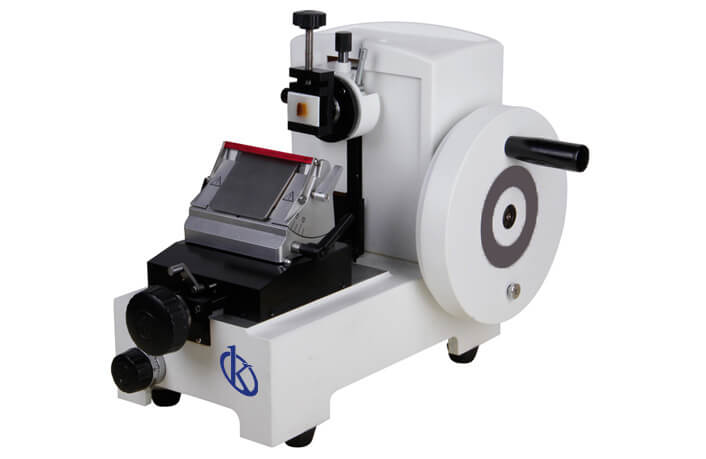
Customization and Advanced Configurations of the YR420 Microtome
The YR420 Microtome is a cutting-edge instrument designed for histological and pathological applications. Its advanced technology ensures high precision and reliability, making it an ideal choice for laboratories looking to enhance their capabilities. This article delves into the various customization options and advanced configurations available for the YR420, ensuring that you can optimize its performance to meet your specific needs.
Understanding the YR420 Microtome
The YR420 features an innovative design integrated with high-precision roller guide rails. This setup guarantees smooth operation and consistent results during sample processing. With a cutting thickness range of 0-500 μm and a minimum cut thickness of 1 μm, the YR420 allows users to achieve precise sectioning for various specimens.
Technical Specifications of the YR420
| Specification | Details |
|---|---|
| Model | YR420 |
| Cutting Thickness Adjustment Range | 0–500 μm |
| Minimum Cutting Thickness Setting | 1 μm |
| Sample Holder Rotation | Any angle within 360 degrees |
| Sample Orientation | XY-8° |
| Horizontal Sample Feed | 28 mm |
| Vertical Sample Stroke | 60 mm |
| Base Movement Range of the Blade Holder | 0-60 mm (front to back) |
| Blade Press Plate Movement Range | 0-23 mm |
| Precision Error | ±1% |
| Maximum Sample Size | 50×60 mm |
| Dimensions | 420×330×330 mm (Width×Depth×Height) |
| Net Weight | 19 kg |
Optional Accessories for the YR420
To further enhance the functionality of the YR420 Microtome, a range of optional accessories can be integrated. These include:
- Advanced Blade Holders: Allow for various blade types, improving the versatility of sectioning.
- Sample Stabilizers: Ensure that samples remain securely in place during cuts, enhancing precision.
- Automated Feed Mechanisms: Facilitate continuous sectioning, reducing manual intervention.
- Maintenance Kits: Provide essential tools and supplies for upkeep and prolonging the device's lifespan.
Advanced Operating Modes
The YR420 Microtome comes with advanced operating modes designed for power users:
- Continuous Sectioning: Ideal for large batches of samples to maximize throughput.
- Precision Mode: Designed for achieving the finest sectioning, suitable for delicate specimens.
- Customizable Profiles: Users can create profiles that store preferred settings for specific projects or sample types.
Customization Strategies
Customizing the YR420 to meet specific laboratory needs involves several strategies:
- Software Upgrades: Regularly updating the microtome's software ensures access to the latest features and improvements.
- Calibration: Regular calibration is essential for maintaining precision and should be done according to your laboratory’s protocols.
- Personalized Settings: Configuring the microtome’s settings allows operators to tailor the device for specific types of tissue or application requirements.
Sector Applications of the YR420
The YR420 Microtome is versatile and can be adapted for various sectors:
- Clinical Laboratories: Ideal for histopathological analysis, allowing for the preparation of high-quality tissue sections.
- Veterinary Research: Enables the examination of animal tissues, supporting the veterinary diagnostics field.
- Educational Institutions: Serves as a reliable tool for teaching histology and pathology in academic settings.
- Industrial Applications: Utilized in materials science for sectioning materials for analysis.
Frequently Asked Questions
How can I customize the settings on the YR420 Microtome?
Customizing settings on the YR420 involves accessing the control panel and adjusting parameters such as cutting thickness, sample feed rates, and blade angles. You can create profiles for different sample types to streamline the process.
What are the recommended maintenance practices for the YR420 Microtome?
Regular maintenance for the YR420 includes cleaning the cutting area, checking blade sharpness, recalibrating the device periodically, and using a maintenance kit for any necessary replacements.
Can the YR420 Microtome be used for both hard and soft tissues?
Yes, the YR420 Microtome is designed to accommodate a variety of tissue types, including both hard and soft tissues, by utilizing appropriate blades and settings for the specific material being sectioned.
What accessories are essential for maximizing the use of the YR420 Microtome?
Essential accessories for the YR420 include advanced blade holders, sample stabilizers, and maintenance kits. These accessories enhance the precision of the microtome and improve overall usability.
How does the YR420 Microtome ensure precision in sectioning?
The YR420 Microtome utilizes high-precision roller guide rails and adjustable cutting thickness to ensure that each section produced is of high quality and consistency, vital for histological applications.
Is there a warranty available for the YR420 Microtome?
Yes, the YR420 Microtome is typically covered under a manufacturer's warranty, which protects against defects in materials and workmanship. Always check the warranty details provided at the time of purchase.
If you are looking for a fusion of innovation and quality, you have come to the right place. At Kalstein, we offer you the luxury of exploring our exclusive catalog of laboratory equipment. We manufacture every device to the highest standards of excellence. Our intuitive and seamless online purchasing channels are designed for your convenience, securing the most competitive prices. Hesitate no longer — we bring science to life, it is time to become part of our community.