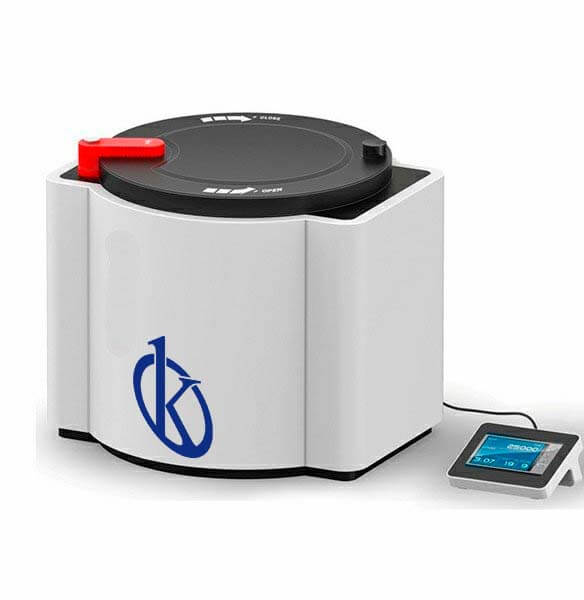
Installation and Commissioning Guide for the YR04960 Microwave Digestion System
The YR04960 Microwave Digestion System is an advanced solution for sample processing in laboratories requiring high precision and efficiency. To ensure the optimal performance of this sophisticated system, a proper installation and commissioning process is crucial. This guide will walk you through the essential steps for setting up the YR04960, focusing on unboxing, installation, power-up, calibration, and common pitfalls to avoid.
Technical Specifications of the YR04960
| Specification | Details |
|---|---|
| Model | YR04960 |
| Quantity of Vessels | 50 |
| Temperature Monitoring System | Non-contact IR sensor monitoring |
| Pressure Monitoring System | Non-contact pressure sensor monitoring |
| Temperature Control Range | 50~400°C |
| Pressure Control Range | 0~10MPa |
| Display | 7-inch color touchscreen |
| Weight | 78KG |
Unboxing Checklist and Initial Inspection
When you receive the YR04960, it is vital to perform an inspection before installation. The following checklist will help you confirm that all components are accounted for:
- YR04960 Microwave Digestion Unit
- Power cable
- User manual
- Vessels and lids
- Installation toolkit
Inspect the equipment for any visible damage during shipping. If any components are missing or damaged, contact your supplier immediately.
Installation Steps for YR04960
Installing the YR04960 requires careful planning to ensure safety and optimal functionality. Follow these steps:
- Select an Appropriate Location: Choose a stable surface that can support the weight of the YR04960 and is away from direct sunlight and extreme temperatures.
- Leveling the Unit: Use a leveling tool to ensure the unit is perfectly flat. This is crucial for stable operation.
- Anchoring (if required): For high-use environments, consider securing the unit to prevent movement.
- Connecting Power: Plug the unit into a power source that meets the specifications outlined in the user manual.
- Initial Interface Setup: Power on the device and follow the on-screen prompts to configure basic settings such as language and date/time.
Power-Up Sequence and First-Run Calibration
Once installed, follow this power-up sequence:
- Ensure all covers are securely placed on the vessels.
- Press the power button on the main interface.
- Allow the system to run a self-check, which will verify that all systems are functioning correctly.
- Once the self-check is complete, perform a calibration of the temperature and pressure monitoring systems.
Calibration can be done by following the detailed instructions in the manual. It typically involves using standard reference materials and verifying readings on the display.
Common Setup Mistakes to Avoid
Even with careful planning, mistakes can happen. Here are some common pitfalls to avoid during setup:
- Ignoring Leveling: Failing to level the unit can affect performance and data accuracy.
- Overloading Vessels: Ensure not to exceed the recommended capacity in each vessel to prevent overpressurization.
- Neglecting Calibration: Calibration should never be skipped, as it is crucial for accurate measurements.
- Incorrect Power Source: Ensure the power supply matches the specifications required for the YR04960.
Frequently Asked Questions
What are the key safety features of the YR04960 Microwave Digestion System?
The YR04960 features automatic venting for pressure release, a robust exterior to withstand corrosive materials, and contactless monitoring systems for both temperature and pressure to ensure user safety.
How do I maintain the YR04960 for optimal performance?
Regular maintenance involves cleaning the exterior and interior components, checking for wear on seals and gaskets, and calibrating the monitoring systems periodically as outlined in the user manual.
Can the YR04960 be used for different types of samples?
Yes, the YR04960 is versatile and can accommodate various types of samples, including organic, inorganic, and complex matrices, provided the appropriate vessels are used.
What is the recommended power supply for the YR04960?
The YR04960 requires a power supply of AC 220V±10%, 10A, 50/60Hz for optimal operation.
Is there a warranty for the YR04960 Microwave Digestion System?
Yes, the YR04960 typically comes with a warranty that covers manufacturing defects and performance issues. Refer to the warranty documentation for specific terms and duration.
How do I troubleshoot common error codes on the YR04960?
Common error codes can usually be resolved by referring to the troubleshooting section in the user manual, which outlines symptoms, probable causes, and solutions.
What accessories are compatible with the YR04960?
Accessories for the YR04960 include various types of digestion vessels, lids, and optional software upgrades for enhanced functionality. Check the product specifications for more details.
For those interested in acquiring the YR04960 Microwave Digestion System or receiving a tailored quote, feel free to reach out for personalized assistance.
If you are looking for a fusion of innovation and quality, you have come to the right place. At Kalstein, we offer you the luxury of exploring our exclusive catalog of laboratory equipment. We manufacture every device to the highest standards of excellence. Our intuitive and seamless online purchasing channels are designed for your convenience, securing the most competitive prices. Hesitate no longer — we bring science to life, it is time to become part of our community.