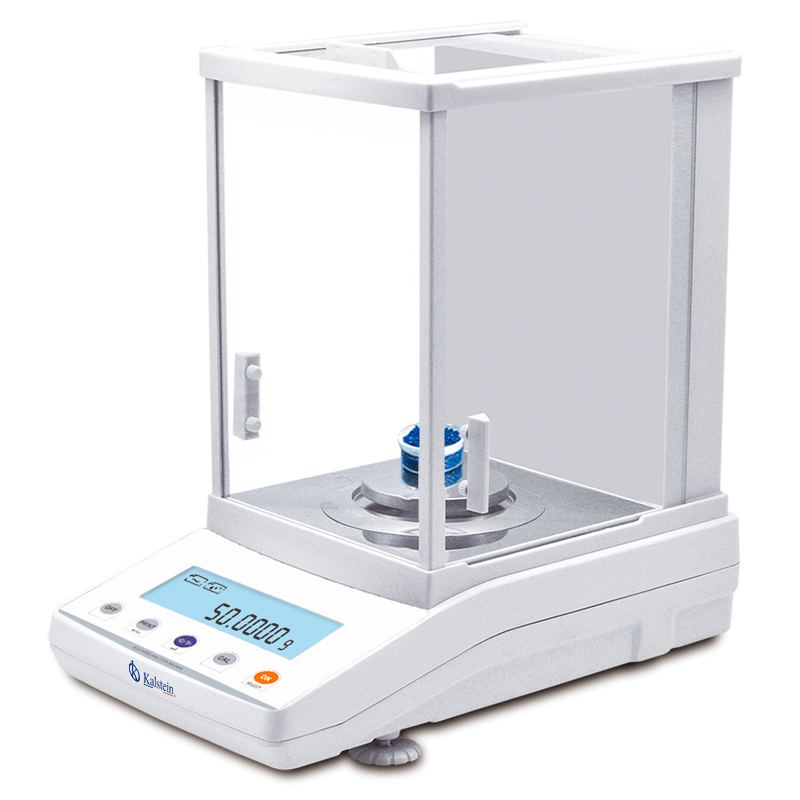
Installation and Commissioning Guide for the YR05581 Internal Calibration Analytical Balance
The YR05581 internal calibration analytical balance is a high-precision instrument designed for laboratory and industrial environments requiring absolute measurement accuracy. This guide aims to provide a thorough understanding of the installation and commissioning process, ensuring optimal performance of the YR05581.
Unboxing and Initial Setup
Upon receiving your YR05581 balance, carefully unbox the unit and check for any visible damage. Ensure that all components are intact by following this checklist:
- YR05581 balance unit
- Power adapter and cord
- Calibration weights
- User manual
- Dust cover
Place the balance on a stable, vibration-free surface, ensuring adequate space for airflow around the device.
Anchoring and Leveling the Balance
For accurate measurements, it is crucial to level the YR05581. Use the built-in leveling bubble and adjust the feet until the bubble is centered. Make sure to anchor the device if required by your laboratory conditions to prevent any movement during use.
Power-Up Sequence
Connect the power cord to the YR05581 and plug it into an appropriate outlet. Turn on the balance using the main switch. Allow the device to warm up for a few minutes to stabilize before use.
First-Run Calibration
The YR05581 features an internal calibration system, making it essential to perform the first-run calibration correctly. Follow these steps:
- Access the calibration menu via the touch screen.
- Follow the on-screen instructions to use the calibration weights provided.
- Confirm the calibration is successful before proceeding with measurements.
Network and USB Setup
To connect the YR05581 to external devices, you can utilize the USB port or the optional RJ45 connection. For USB:
- Connect the balance to a computer using a USB cable.
- Install any necessary drivers as instructed in the user manual.
For the RJ45 connection, connect an Ethernet cable to the balance and configure the settings through the interface.
Validation of First Measurement
After calibration, perform a test measurement using a known weight to validate the accuracy of the YR05581. Compare the measured value with the known value. If discrepancies occur, recalibrate the balance.
Common Setup Mistakes
Avoid these common errors during installation and commissioning:
- Not leveling the unit properly.
- Skipping the first-run calibration.
- Placing the balance near vibrating machinery or heat sources.
Technical Specifications of the YR05581
| Model | Brand | Category | Subcategory | Price (USD) | Weight (kg) | Dimensions (mm) |
|---|---|---|---|---|---|---|
| YR05581 | Kalstein | Balances | Analytical Balance | 285.00 | 10 | 340x215x350 |
Frequently Asked Questions
What is the maximum capacity of the YR05581 balance?
The maximum capacity of the YR05581 balance is 120 grams, allowing for precise measurements within this limit.
How does the internal calibration feature work?
The internal calibration feature automatically adjusts the balance to ensure accuracy, reducing the need for manual calibration with external weights.
Can the YR05581 be connected to a printer?
Yes, the YR05581 has options for connecting to a printer, facilitating easy documentation of measurement results.
What environmental conditions are required for the YR05581?
The YR05581 operates best at temperatures between 15°C and 35°C with a stable humidity level. Ensure adequate ventilation and avoid placing it near heat sources.
How often should the balance be calibrated?
It is recommended to calibrate the YR05581 regularly, especially when moved to a different location or after significant temperature changes.
What are the common troubleshooting steps for the YR05581?
Common troubleshooting involves checking power connections, ensuring the balance is leveled, and recalibrating if inconsistent readings occur.
Where can I request a quote for the YR05581 balance?
You can easily request a quote for the YR05581 balance through our online platform.
If you are looking for a fusion of innovation and quality, you have come to the right place. At Kalstein, we offer you the luxury of exploring our exclusive catalog of laboratory equipment. We manufacture every device to the highest standards of excellence. Our intuitive and seamless online purchasing channels are designed for your convenience, securing the most competitive prices. Hesitate no longer — we bring science to life, it is time to become part of our community.