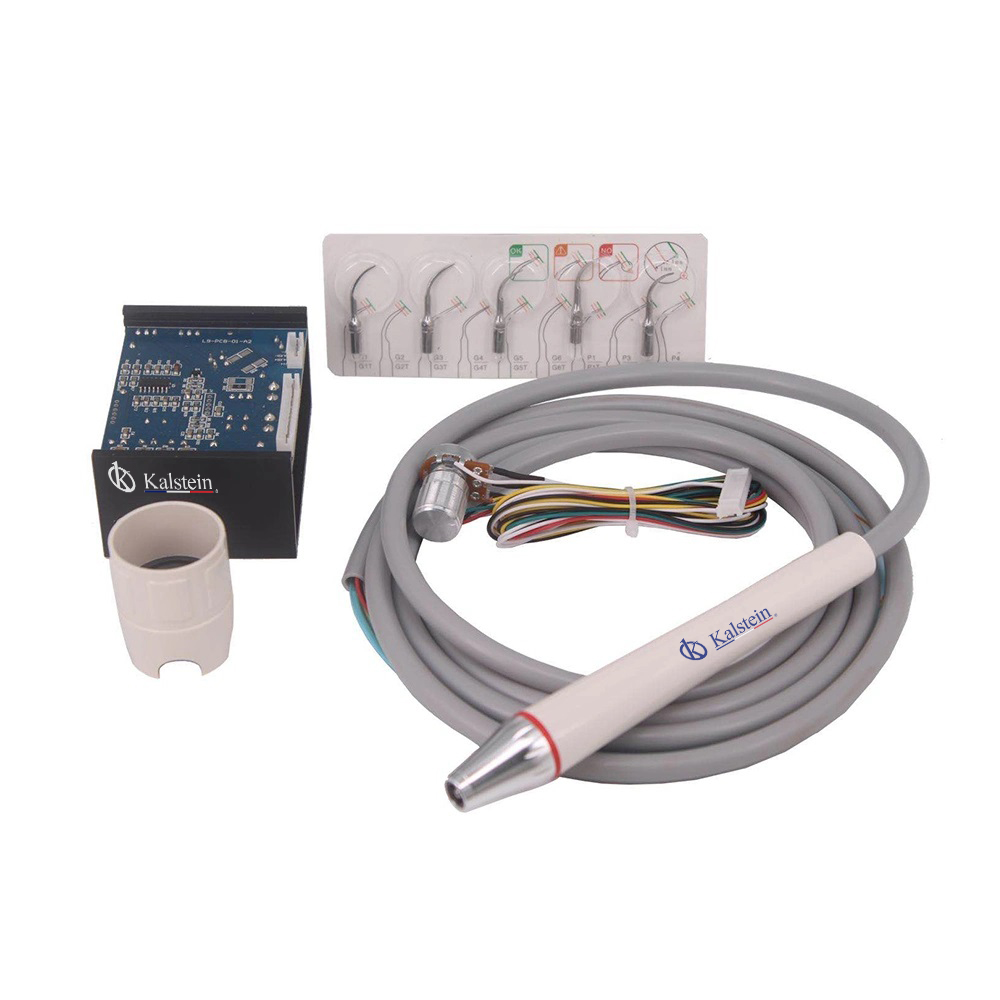
Installation and Commissioning Guide for the YR06012-OP5 Dental Accessory
The YR06012-OP5 Dental Accessory is a critical component for dental practices, facilitating various procedures and ensuring efficiency in clinical settings. Proper installation and commissioning are essential to achieve the desired operational effectiveness. In this guide, we will explore everything you need to know about installing and commissioning the YR06012-OP5, covering unboxing, setup, calibration, and common issues.
Unboxing Checklist for YR06012-OP5
When unpacking the YR06012-OP5, it is crucial to perform a thorough checklist to ensure that all components are included and undamaged. Here’s what to look for:
- YR06012-OP5 unit
- Power cable
- Operating manual
- Warranty card
- Accessory kit (if applicable)
Inspect each item for any visible damage resulting from shipping. Ensure that all necessary components are present before proceeding to installation.
Installation Steps for YR06012-OP5
The installation of the YR06012-OP5 involves several steps to ensure proper functioning. Follow these guidelines:
- Location Selection: Choose a flat, stable surface for installation that can support the weight of the unit and the additional accessories.
- Leveling the Unit: Use a spirit level to ensure the unit is perfectly level. Adjust the feet as necessary.
- Power Connection: Connect the power cable to a properly grounded outlet. Verify that the voltage matches the specifications of the YR06012-OP5.
- Initial Power-Up: Switch on the unit and observe the boot sequence. Ensure that there are no error messages displayed.
- Calibration: Follow the operating manual to calibrate the YR06012-OP5 to ensure accurate operation. Perform any necessary adjustments based on the calibration results.
After installation, the unit should be ready for operational testing.
Common Setup Mistakes with YR06012-OP5
Even experienced operators can encounter challenges during the installation of the YR06012-OP5. Here are common mistakes to avoid:
- Incorrect Power Supply: Ensure that the power outlet matches the specifications. Using the wrong voltage can damage the unit.
- Improper Leveling: An unlevel unit can lead to inaccurate measurements and operational issues. Always verify leveling before use.
- Skipping Calibration: Failing to calibrate the device can result in operational inefficiencies and compromised results.
Technical Specifications of YR06012-OP5
| Model | Description | Used For |
|---|---|---|
| YR06012-OP5 | N2L scaler integrated with LED handpiece | All our dental units |
Understanding the technical specifications is crucial for effective operation and maintenance of the YR06012-OP5.
Frequently Asked Questions
What should I do if the YR06012-OP5 does not power on?
If the YR06012-OP5 does not power on, check the power source to ensure it is functioning correctly. Confirm that the power cable is securely connected to both the device and the outlet. If the issue persists, consult the troubleshooting section of the manual.
How do I perform a calibration on the YR06012-OP5?
Calibration should be performed according to the operating manual. Generally, you will need to access the calibration menu on the device, input the standard parameters, and execute the calibration sequence as described in the manual.
What are the common error codes for the YR06012-OP5?
Common error codes include E-01 for power supply issues, E-02 for calibration errors, and E-03 for operational malfunctions. Refer to the troubleshooting section for detailed explanations and solutions.
Can I use third-party accessories with the YR06012-OP5?
While it is recommended to use accessories specified by the manufacturer, some third-party accessories may be compatible. Verify compatibility and quality before use to avoid operational issues.
What maintenance is required for the YR06012-OP5?
The YR06012-OP5 requires regular cleaning and inspection to ensure optimal performance. Follow the maintenance schedule outlined in the operating manual, including regular checks on the LED handpiece and scaler functions.
Is there a warranty for the YR06012-OP5?
Yes, the YR06012-OP5 comes with a warranty covering manufacturing defects. Review the warranty details provided with your unit for specific terms and conditions.
If you are looking for a fusion of innovation and quality, you have come to the right place. At Kalstein, we offer you the luxury of exploring our exclusive catalog of laboratory equipment. We manufacture every device to the highest standards of excellence. Our intuitive and seamless online purchasing channels are designed for your convenience, securing the most competitive prices. Hesitate no longer — we bring science to life, it is time to become part of our community.