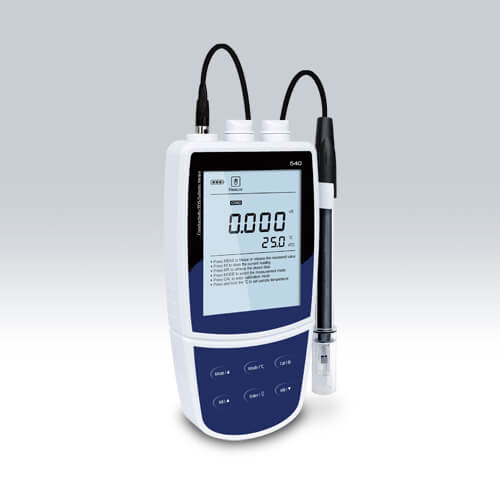
Installation and Startup Guide for the YR01818-2 Conductivity Meter
The YR01818-2 Portable Conductivity Meter is an essential tool for accurately measuring conductivity, TDS, and salinity in various environments. This guide provides step-by-step instructions on the installation and initial setup to ensure optimal performance and reliability.
Unboxing and Initial Inspection
Upon receiving the YR01818-2, carefully unbox the device and check for all included items. The standard package should contain:
- YR01818-2 Conductivity Meter
- Conductivity Electrode CON-0.1
- Conductivity Electrode CON-1
- Temperature Probe TP-10K
- Calibration Standards (84 µS/cm, 1413 µS/cm, 12.88 mS/cm)
- Carrying Case
- User Manual
Verify that no items are damaged during shipping. If any discrepancies are found, report them immediately to your supplier.
Installation Requirements
Before starting the installation, ensure that your workspace meets the following requirements:
- Temperature range: 0 to 50°C (32 to 122°F)
- Humidity level: 0% to 85% (non-condensing)
- Stable power supply: 3 AA batteries or DC 5V adapter
- Clearance around the device for ventilation
These conditions will help ensure accurate readings and prolong the lifespan of the device.
Powering Up the YR01818-2
To power on the YR01818-2, insert the batteries or connect the device to the DC power adapter. Ensure the connections are secure. Once powered, the LCD backlight will illuminate, indicating that the device is ready for use.
Calibrating the YR01818-2
Calibration is a critical step to ensure accuracy in measurements. The YR01818-2 supports 1 to 5 point calibration. Follow these steps:
- Turn on the device.
- Select the calibration mode from the menu.
- Using the provided calibration standards, immerse the electrode in the first standard solution (e.g., 84 µS/cm).
- Press the calibration button and wait for the reading to stabilize.
- Repeat for the remaining calibration standards as required.
Consult the user manual for detailed instructions on adjusting the TDS factor and other settings essential for precise measurement.
First Run Measurement
After calibration is completed, the YR01818-2 is ready for its first measurement. Here’s how to take a reading:
- Ensure the electrode is clean and correctly connected.
- Immerse the electrode in the sample solution.
- Wait for a stable reading, which will be displayed on the LCD screen.
- Record the measurement for future reference.
For accurate results, make sure to rinse the electrode with distilled water between different sample measurements.
Common Setup Mistakes
Every operator may encounter some common errors during the installation and startup of the YR01818-2. Here are some tips to avoid these pitfalls:
- Neglecting to calibrate the device before the first use can lead to inaccurate readings.
- Using dirty electrodes can contaminate your samples.
- Improperly configured settings, such as TDS factor, can distort the final results.
- Failing to check battery levels can cause unexpected shutdowns during measurements.
Always refer to the user manual during the setup process to ensure a smooth operation.
Technical Specifications of the YR01818-2
| Model | YR01818-2 |
|---|---|
| Conductivity Range | 0.01 to 20.00, 200.0, 2000 µS/cm; 20.00, 200.0 mS/cm |
| Resolution | 0.001, 0.01, 0.1, 1 |
| Accuracy | ±0.5% F.S. |
| Calibration Points | 1 to 5 points |
| TDS Range | 0.00 to 10.00, 100.0, 1000 ppm; 10.00, 200.0 ppt |
| Salinity Range | 0.00 to 80.00 ppt, 0.00 to 42.00 psu |
| Temperature Compensation | Automatic compensation from 0 to 100 °C |
| Memory Storage | Up to 500 sets of data |
| Power Supply | 3 AA batteries or DC 5V adapter |
Frequently Asked Questions
How often should I calibrate the YR01818-2?
It is recommended to calibrate the YR01818-2 at least once a month or before critical measurements, especially if the device has been subjected to extreme temperature changes or heavy usage.
What should I do if the YR01818-2 shows inconsistent readings?
Inconsistent readings may indicate that the electrode is dirty or improperly calibrated. Clean the electrode according to the manufacturer's instructions and recalibrate the device with fresh standards.
Can I use the YR01818-2 for seawater measurements?
Yes, the YR01818-2 can be used for seawater measurements, as it is equipped to measure salinity accurately within the specified range.
What is the maximum temperature the YR01818-2 can handle?
The maximum temperature range for the YR01818-2 is from 0 to 105°C (32 to 221°F). Ensure that the measurements do not exceed this temperature to maintain accuracy and avoid damage.
Is there a warranty for the YR01818-2?
Yes, the YR01818-2 typically comes with a warranty period of one year from the date of purchase. Always check the terms and conditions provided by the manufacturer for specific details.
How can I extend the lifespan of the YR01818-2?
To prolong the lifespan of your YR01818-2, keep it clean, calibrate regularly, store it in a protective case, and avoid exposure to extreme conditions such as high humidity and temperature fluctuations.
Where can I find replacement parts for the YR01818-2?
Replacement parts and accessories for the YR01818-2 can typically be ordered through your supplier or the manufacturer's official channels. Refer to the user manual for part numbers and ordering information.
If you are looking for a fusion of innovation and quality, you have come to the right place. At Kalstein, we offer you the luxury of exploring our exclusive catalog of laboratory equipment. We manufacture every device to the highest standards of excellence. Our intuitive and seamless online purchasing channels are designed for your convenience, securing the most competitive prices. Hesitate no longer — we bring science to life, it is time to become part of our community.