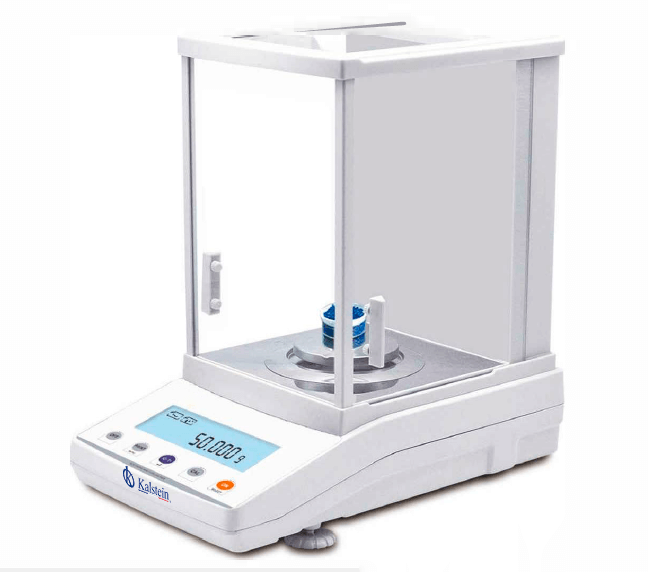
Installation and Startup Guide for the YR05769 Analytical Balance
The YR05769 Analytical Balance is a sophisticated instrument designed for precise measurement in various laboratory environments. This guide provides a comprehensive overview of the installation and startup process, ensuring you can utilize this device to its fullest potential.
Unboxing and Initial Setup
Before starting the installation, it is important to carefully unbox the YR05769 Analytical Balance and ensure that all components are accounted for. Here’s a checklist to get you started:
- YR05769 Analytical Balance
- Power adapter
- User manual
- Calibration weights (if available)
- Windshield (if applicable)
Site Requirements for Optimal Performance
To ensure the optimal performance of the YR05769, it is crucial to place it in a suitable environment. Here are the key site requirements:
| Requirement | Specification |
|---|---|
| Temperature | 15-35°C |
| Humidity | Below 85% Relative Humidity |
| Vibration | Minimal; use anti-vibration table |
| Clearance | At least 300mm around the device |
Leveling the Analytical Balance
Proper leveling is essential for accurate measurements. Follow these steps to level the YR05769:
- Place the balance on a stable, vibration-free surface.
- Use the built-in leveling feet to adjust the height of the balance.
- Ensure the bubble level indicator is centered within the marked circle.
Powering Up and Initial Calibration
Once the balance is leveled, it is time to power it up:
- Connect the power adapter to the YR05769.
- Press the power button to turn on the device.
- Allow the balance to warm up for at least 30 minutes before calibration.
For initial calibration:
- Access the calibration mode via the menu.
- Use the provided calibration weights to calibrate the device accurately.
Windshield Installation
If your YR05769 comes with a windshield, follow these instructions:
- Carefully attach the windshield to the balance according to the manual.
- Ensure it closes properly to minimize air currents.
Networking and Connectivity
The YR05769 offers connectivity options for data transfer:
- RS232 standard port for direct connection to printers or computers.
- USB option available for enhanced connectivity.
Ensure the correct settings are selected in the device menu for successful data transmission.
Common Installation Mistakes and Troubleshooting
During installation, common mistakes may hinder optimal performance. Below are the top errors and solutions:
| Issue | Cause | Solution |
|---|---|---|
| Balance not powering on | Improper power connection | Check power outlet and connections. |
| Inconsistent readings | Improper leveling | Re-level the balance and check surface stability. |
| Error code displayed | Calibration required | Perform calibration with standard weights. |
Technical Specifications of the YR05769
| Feature | Specification |
|---|---|
| Model | YR05769 |
| Capacity | 200g |
| Readability | 0.001g |
| Minimum Weight | 0.004g |
| Repeatability | ±0.002g |
| Dimensions | 340x215x350mm |
| Weight | 10kg |
Frequently Asked Questions
What is the maximum capacity of the YR05769 Analytical Balance?
The YR05769 Analytical Balance has a maximum capacity of 200 grams, allowing for precision measurements in various laboratory applications.
How can I perform a calibration on the YR05769?
To perform calibration, access the calibration mode in the device menu and use the appropriate calibration weights to ensure accurate readings.
What is the readability of the YR05769?
The readability of the YR05769 is 0.001 grams, enabling high-precision measurements essential for analytical tasks.
How do I connect the YR05769 to a printer?
You can connect the YR05769 to a printer using the RS232 standard port or the optional USB connection for seamless data transfer.
What environmental conditions should be maintained for the YR05769?
The YR05769 operates optimally between 15°C to 35°C with a humidity level below 85% to prevent measurement inaccuracies.
What should I do if I encounter an error code on the YR05769?
If an error code appears, consult the user manual for diagnostic steps; commonly, recalibrating the balance resolves most errors.
Can I request additional accessories for the YR05769?
Yes, additional accessories and optional modules are available for the YR05769, which can enhance its functionality based on your laboratory needs.
If you are looking for a fusion of innovation and quality, you have come to the right place. At Kalstein, we offer you the luxury of exploring our exclusive catalog of laboratory equipment. We manufacture every device to the highest standards of excellence. Our intuitive and seamless online purchasing channels are designed for your convenience, securing the most competitive prices. Hesitate no longer — we bring science to life, it is time to become part of our community.