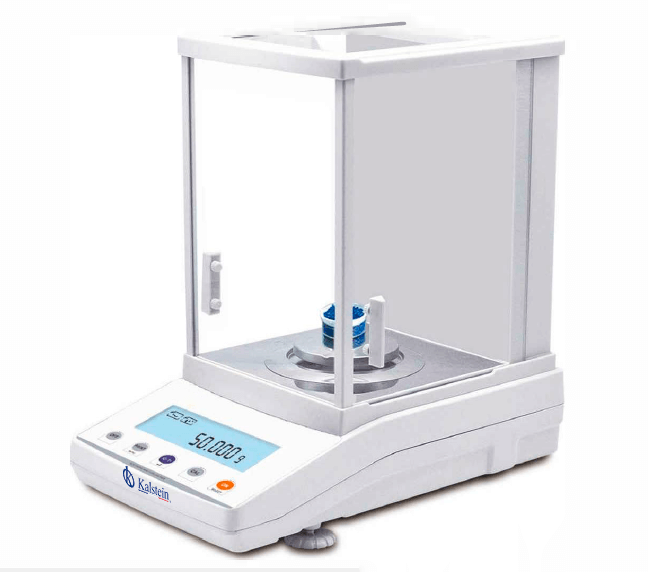
Installation and Startup Guide for the YR05772 Analytical Balance
The YR05772 Analytical Balance is a sophisticated instrument designed to provide accurate and reliable measurements in laboratory settings. This guide focuses on the installation and startup procedures essential for ensuring optimal performance from your balance. Proper setup not only guarantees accurate readings but also extends the life of the equipment.
Understanding the YR05772 Analytical Balance
The YR05772 model is equipped with an electromagnetic sensor, internal calibration capabilities, and a robust aluminum housing. It features a large windproof cover to minimize external disturbances and an easy-to-read LCD display. Key functionalities such as tare, counting, and unit conversion make it a versatile tool for various applications in clinical and research environments.
Technical Specifications of the YR05772
| Specification | Detail |
|---|---|
| Model | YR05772 |
| Capacity | 600g |
| Readability | 0.001g |
| Minimum Weight | 0.004g |
| Repeatability | ±0.002g |
| Dimensions | 340x215x350mm |
| Communication | RS232 (standard) / USB (optional) |
| Operating Temperature | 15-35°C |
Unboxing and Initial Setup
Upon receiving your YR05772 Analytical Balance, carefully unbox the device and verify all components are present. The unboxing checklist includes:
- YR05772 Analytical Balance
- Power cable
- User manual
- Calibration weights
- Windproof cover
Ensure that the balance is placed on a stable, vibration-free surface to enhance measurement accuracy. It is essential to level the balance using the built-in leveling feet.
Power-Up Sequence and Calibration
Once the balance is correctly positioned and leveled, connect it to a power source using the provided cable. Power up the device and wait for it to initialize. The first step in the calibration process involves using the internal calibration function (JA-N). Follow these steps:
- Access the calibration menu as per the user manual.
- Select the internal calibration option.
- Use the calibration weights to ensure accuracy.
Performing this calibration ensures that the device operates at peak performance from the outset.
First Measurement and Validation
After calibration, the balance is ready for its first measurement. Place the sample on the weighing pan, ensuring it is clean and dry. Read the measurements displayed on the LCD screen. For accurate validation, you can take multiple readings and compare them to check for consistency.
Common mistakes during this phase include:
- Not allowing the balance to stabilize before taking a measurement.
- Exposing the balance to drafts or direct sunlight.
Addressing these issues will help in obtaining reliable results.
Common Setup Issues and Troubleshooting
Below is a table illustrating common issues encountered during the installation and initial setup, with probable causes and solutions:
| Symptom | Probable Cause | Solution |
|---|---|---|
| Device does not power on | Faulty power supply | Check power connection and use a different outlet |
| Error code E-03 | Calibration error | Recalibrate using the standard weights |
| Inconsistent readings | Drafts affecting balance | Relocate balance to a windproof area |
Frequently Asked Questions
What are the key features of the YR05772 Analytical Balance?
The YR05772 features an electromagnetic sensor, a large windproof cover, internal calibration, an LCD display with white backlight, and functionalities for tare, counting, and unit conversion.
How do I calibrate the YR05772 Analytical Balance?
Calibration of the YR05772 can be performed using the internal calibration function. It's crucial to use standard calibration weights to ensure accuracy during this process.
What is the maximum capacity of the YR05772?
The maximum capacity of the YR05772 Analytical Balance is 600 grams, with a readability of 0.001 grams.
What environmental conditions are optimal for the YR05772?
The YR05772 operates best within a temperature range of 15-35°C and should be placed in a location free from drafts and direct sunlight.
Can I connect the YR05772 to a computer?
Yes, the YR05772 supports RS232 communication as standard and offers an optional USB connection for interfacing with computers and other devices.
What maintenance is required for the YR05772?
Regular cleaning of the balance and recalibration is necessary to maintain accuracy and reliability. It's also advisable to check cables and connections periodically.
Where can I find replacement parts for the YR05772?
Replacement parts and consumables for the YR05772 can typically be obtained through authorized suppliers or directly from the manufacturer.
If you are looking for a fusion of innovation and quality, you have come to the right place. At Kalstein, we offer you the luxury of exploring our exclusive catalog of laboratory equipment. We manufacture every device to the highest standards of excellence. Our intuitive and seamless online purchasing channels are designed for your convenience, securing the most competitive prices. Hesitate no longer — we bring science to life, it is time to become part of our community.