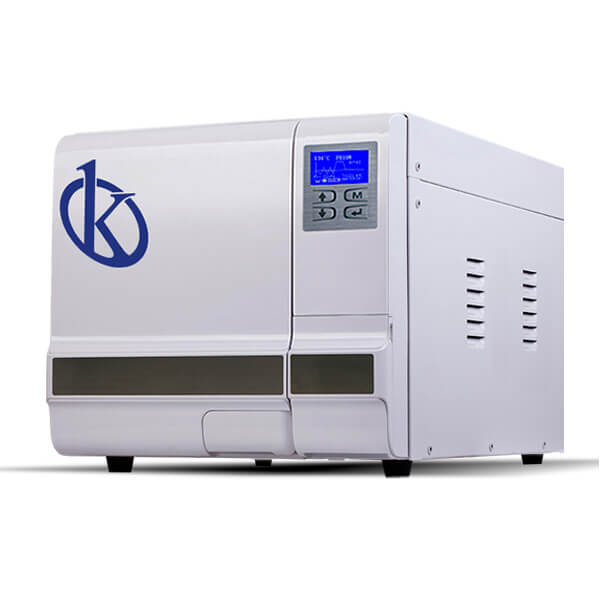
Understanding Measurement Interpretation for the YR03392 Autoclave: Tips and Techniques
The YR03392 autoclave model is a highly effective desktop sterilization solution that operates on the principles of steam sterilization. As a user, being adept at interpreting the results and readings of this equipment is vital for maintaining laboratory standards and ensuring successful sterilization cycles.
Introduction to the YR03392 Autoclave
The YR03392 is classified as a Class N autoclave. Its design relies on a dynamic air extraction system, which allows for uniform temperature maintenance and complete steam distribution. Understanding how to interpret results from this autoclave is crucial for operators in clinical, industrial, and educational sectors.
Technical Specifications of the YR03392 Autoclave
| Model | Brand | Category | Subcategory | Price USD | Price EUR | Gross Weight | Dimensions |
|---|---|---|---|---|---|---|---|
| YR03392 | Kalstein | Autoclave | Horizontal Autoclave | $750.00 | €1456 | 45 kg | 420x370x595mm |
Principles of Operation and Measurement Interpretation
The YR03392 uses steam as the primary sterilizing agent. The pressure and temperature readings displayed are critical for verifying that the autoclave is functioning accurately. Users must understand the relationship between temperature, pressure, and time during the sterilization process.
For example, a standard sterilization cycle for solid items requires a temperature of 134°C at 210 kPa for at least 4 minutes. Familiarity with these metrics will allow users to interpret the readings effectively.
Common Misinterpretations of Measurements
Operators often misinterpret readings due to a lack of understanding of what constitutes a normal range. The LCD screen displays vital information such as current temperature, pressure, and elapsed time. Misreading these can lead to inadequate sterilization or compromised equipment.
- Reading the temperature too early could indicate that the autoclave hasn't achieved the sterilization environment.
- Ignoring error codes can lead to repeated issues that impact the efficiency of the sterilization process.
Practical Tips for Accurate Reading
To ensure readings from the YR03392 are accurate, users should consider the following:
- Regularly calibrate the autoclave according to the manufacturer's guidelines.
- Conduct routine maintenance checks to ensure all systems are functioning correctly.
- Understand how to reset and interpret error codes displayed on the LCD screen.
Reading the Display: A Step-by-Step Guide
Operators should be familiar with key metrics shown on the autoclave's display:
- Monitor the temperature reading: Ensure it reaches the desired level before considering any cycle complete.
- Check the pressure: Verify that it remains within acceptable ranges throughout the cycle.
- Time elapsed: Always ensure that the time shown matches the criteria for the cycle type in use.
Frequently Asked Questions
What is the optimal temperature and pressure for the YR03392 autoclave?
The optimal temperature for solid items is 134°C at 210 kPa for a minimum of 4 minutes. For liquids, the temperature can be 134°C at 210 kPa for a duration of 10 minutes.
How can I reset error codes on the YR03392?
To reset error codes, ensure all doors are securely locked and the chamber pressure is equalized. You may also refer to the user manual for specific error code definitions and solutions.
What should I do if the sterilization cycle does not complete?
If the cycle does not complete, check for proper sealing of the door, verify that the water levels are sufficient, and ensure that the equipment is not overloaded. Each of these can prevent successful completion of a cycle.
What maintenance is required for the YR03392 autoclave?
Regular maintenance includes checking seals, cleaning filters, and ensuring that all components function correctly. Consult the user manual for a detailed maintenance schedule.
Can I use the YR03392 for different types of materials?
Yes, the YR03392 is versatile and can process solid, liquid, wrapped, textile, and prion materials. Always refer to the operating manual for specific settings and guidelines for each material type.
How do I interpret the LCD display readings?
The LCD display shows the current temperature, pressure, and time remaining. Ensure you understand the normal operating ranges to interpret these readings accurately during the sterilization process.
For more insights and to request a quote, please reach out through our contact channels.
If you are looking for a fusion of innovation and quality, you have come to the right place. At Kalstein, we offer you the luxury of exploring our exclusive catalog of laboratory equipment. We manufacture every device to the highest standards of excellence. Our intuitive and seamless online purchasing channels are designed for your convenience, securing the most competitive prices. Hesitate no longer — we bring science to life, it is time to become part of our community.