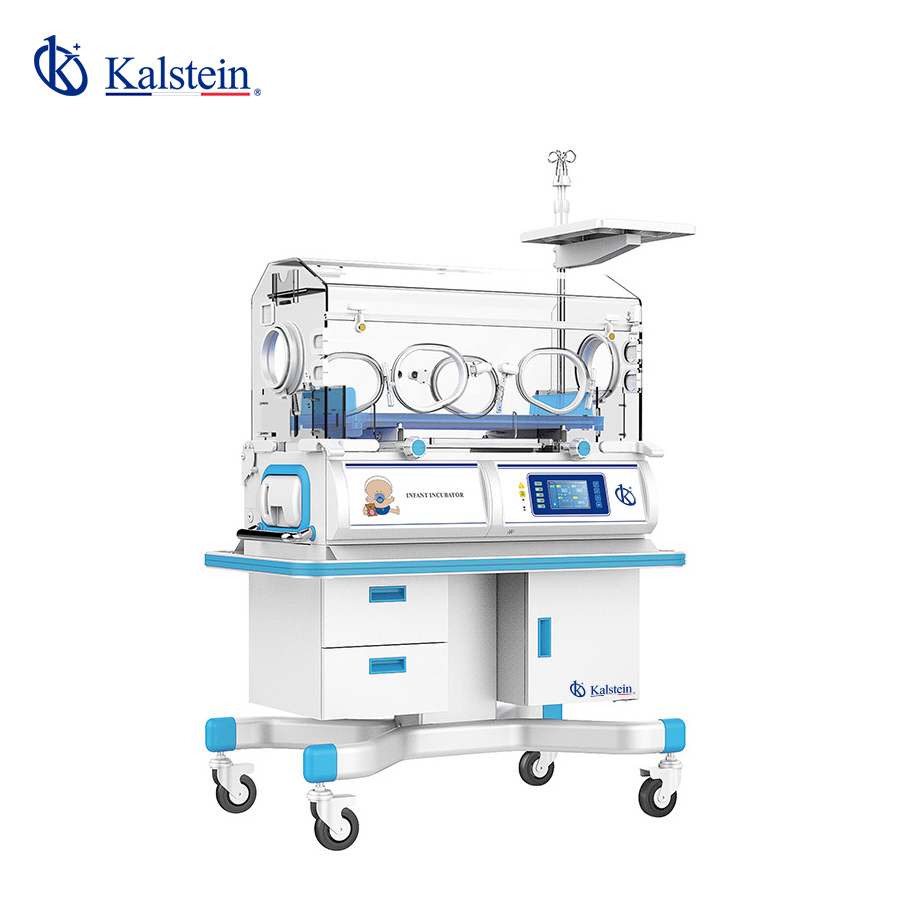
Troubleshooting Common Issues with the YR02187 Infant Incubator
The YR02187 Infant Incubator is essential for maintaining a controlled environment for newborns, particularly those who are premature or ill. Understanding how to troubleshoot common issues is vital for ensuring optimal performance and safety. This guide will delve into frequent symptoms encountered during operation, probable causes, and effective solutions.
Technical Specifications of the YR02187
| Model | YR02187 |
|---|---|
| Temperature Control of Air | Yes |
| Skin Temperature Control | Yes |
| Air Temperature Control at 37 °C | Yes |
| Reclining Cradle | Yes |
| Humidity Display | Yes |
| Humidity Control | Yes |
| Side Door | Optional |
| Aluminum Heat Retention Tank | Yes |
| Operation Windows and Access Ports | 2 Ports, 4 Windows |
| Cabinet | Yes |
| Adjustable Working Height | Optional |
| Additional Rear Door | Optional |
| Baby Weighing Bed | Optional |
| Low Noise DC Motor | Optional |
Common Symptoms and Troubleshooting Guide
This section provides insight into the common symptoms of the YR02187, their probable causes, and effective solutions.
Equipment Does Not Power On
If the incubator does not power on, it may be due to several reasons:
- Power Source Issue: Ensure that the power outlet is functional and that the power cord is properly connected.
- Internal Fuse Failure: Check and replace the internal fuse if blown.
- Faulty Power Switch: Inspect the power switch for damage or malfunction.
Temperature Fluctuations
Inconsistent temperature readings can pose risks to the patient. Possible causes include:
- Calibration Issues: Regularly calibrate the temperature sensors to maintain accuracy.
- Blocked Air Vents: Ensure that air circulation is not obstructed.
- Faulty Temperature Sensor: Test and replace the temperature sensor if necessary.
Humidity Control Failure
Failing to achieve the desired humidity levels can be attributed to:
- Water Supply Issues: Ensure the water reservoir is filled and correctly connected.
- Sensor Malfunction: Inspect the humidity sensors for functionality.
Visible Alarms and Error Codes
When alarms trigger, it is crucial to identify the issues:
- Priority 1 Alarms: Immediate attention is required; refer to the user manual for specific codes.
- Priority 2 and 3 Alarms: Monitor the situation but immediate action may not be necessary.
Symptom to Cause and Solution Table
| Symptom | Probable Cause | Solution |
|---|---|---|
| Equipment Does Not Power On | Power source issue, internal fuse failure, faulty power switch | Check power connection, replace fuse, inspect switch |
| Temperature Fluctuations | Calibration issues, blocked air vents, faulty temperature sensor | Calibrate sensors, clear vents, test and replace sensor |
| Humidity Control Failure | Water supply issues, sensor malfunction | Refill water reservoir, inspect humidity sensors |
| Visible Alarms | Error codes and alarm priorities | Refer to the user manual for troubleshooting |
Frequently Asked Questions
What should I do if the YR02187 shows an error code?
If the YR02187 displays an error code, refer to the user manual for specific guidance related to the code. The manual provides details on the priority of the error and suggested actions to resolve it.
How often should I calibrate the temperature sensors of the YR02187?
It is recommended to calibrate the temperature sensors of the YR02187 at least once a month or whenever there is a noticeable discrepancy in the readings.
Can I use the YR02187 without additional accessories?
Yes, the YR02187 can function without additional accessories; however, optional components can enhance its capabilities and improve the care provided to the infants.
What is the best way to clean and maintain the YR02187?
Regular cleaning of the incubator is essential. Use a mild disinfectant and ensure that all removable parts are cleaned and dried thoroughly. Follow the manufacturer’s guidelines for maintenance schedules and procedures.
Is there a warranty for the YR02187, and what does it cover?
The YR02187 typically comes with a warranty that covers defects in materials and workmanship. Please consult the specific warranty documentation provided at the time of purchase for detailed terms.
How can I enhance the performance of the YR02187?
To enhance the performance of the YR02187, ensure regular maintenance, calibrate the sensors frequently, and use compatible accessories designed to work with this model.
If you are looking for a fusion of innovation and quality, you have come to the right place. At Kalstein, we offer you the luxury of exploring our exclusive catalog of laboratory equipment. We manufacture every device to the highest standards of excellence. Our intuitive and seamless online purchasing channels are designed for your convenience, securing the most competitive prices. Hesitate no longer — we bring science to life, it is time to become part of our community.