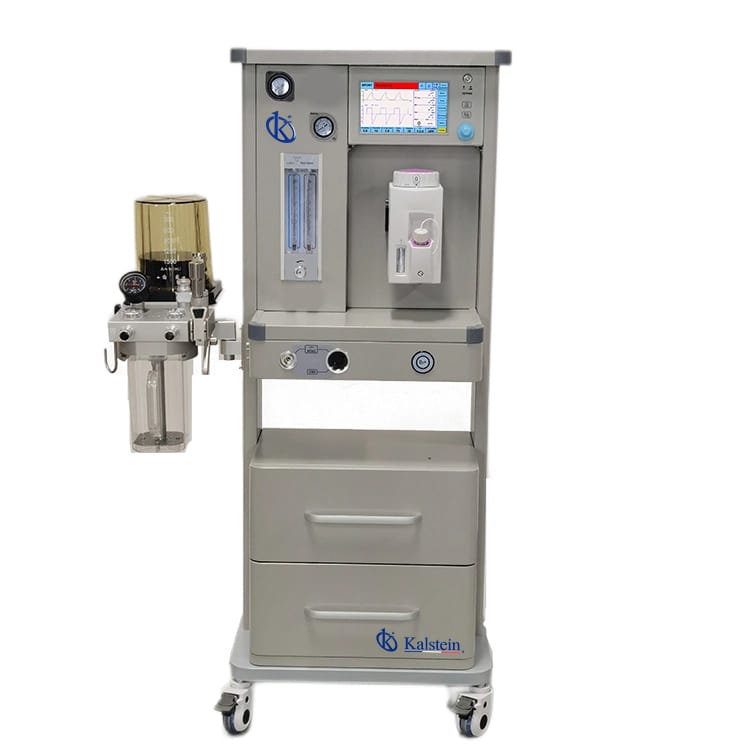
Troubleshooting Common Issues with the YR06100 Veterinary Anesthesia Machine
The YR06100 Veterinary Anesthesia Machine is designed for the efficient and safe administration of anesthesia to animals ranging in weight from 0.5 to 100 kg. Despite its advanced technology and user-friendly design, operators may encounter various issues during its use. This article aims to provide a comprehensive guide on troubleshooting common problems associated with the YR06100, ensuring veterinary professionals can operate this equipment effectively.
Technical Overview of the YR06100
| Feature | Description |
|---|---|
| Model | YR06100 |
| Working Mode | Closed, Semi-closed, Semi-open, Open |
| Driven Mode | Pneumatically driven manual controlled |
| Application | Animals weighing 0.5-100 kg |
| Alarm Parameters | Upper tidal volume alarm, low oxygen alarm, apnea, power failure |
| Control System | Proportional valve control system |
| Screen | 8-inch high-definition touch screen |
| Battery Life | More than two hours |
Common Symptoms and Troubleshooting Steps
In this section, we will explore common symptoms that operators may experience with the YR06100 and provide troubleshooting steps to address these issues effectively.
Equipment Does Not Power On
If the YR06100 fails to power on, it may indicate an electrical issue.
- Check Power Supply: Ensure that the power cord is securely connected to both the machine and the power outlet. Inspect the power outlet using another device to confirm its functionality.
- Inspect Fuses: Check for any blown fuses in the power supply circuit. Replace them if necessary.
- Battery Status: If using the battery, verify that it is charged and functioning correctly.
Error Code E-03
Error code E-03 typically indicates a problem with the oxygen supply.
- Check Oxygen Supply: Ensure that the oxygen tank is full and properly connected to the machine.
- Inspect Connections: Look for any leaks or damaged hoses in the oxygen supply line.
- Reconnect: Sometimes, simply disconnecting and reconnecting the oxygen supply can resolve the error.
Inconsistent Readings
Inconsistent readings on the display can disrupt the administration of anesthesia and compromise patient safety.
- Calibration Check: Ensure that the machine is properly calibrated. Follow the calibration procedure outlined in the user manual.
- Sensor Inspection: Inspect the sensors for any dirt or obstruction that may affect readings. Clean them as recommended.
- Environmental Factors: Evaluate the operating environment for excessive vibrations or electromagnetic interference that could impact performance.
Frequent Alarms Triggered
Frequent alarms can be alarming and may indicate various underlying issues.
- Volume Settings: Check the tidal volume settings and ensure they are appropriate for the animal being treated.
- Oxygen Levels: Monitor the oxygen concentration and ensure it is within the recommended ranges.
- System Malfunction: If alarms persist, consult the manual for specific alarm troubleshooting steps related to each type of alarm.
Common Troubleshooting Symptoms Table
| Symptom | Probable Cause | Diagnostic Steps | Solution |
|---|---|---|---|
| Equipment Does Not Power On | Power supply issue | Check power cord and outlet | Reconnect or replace power components |
| Error Code E-03 | Oxygen supply problem | Inspect oxygen connections | Ensure proper connections and check tank |
| Inconsistent Readings | Calibration error | Check for sensor obstructions | Calibrate and clean sensors |
| Frequent Alarms | Incorrect volume or oxygen settings | Monitor settings and alarm types | Adjust settings as per guidelines |
Frequently Asked Questions
What should I do if my YR06100 is displaying an error code?
Begin by referring to the user manual for a detailed explanation of the error code. Follow the recommended troubleshooting steps to resolve the issue. If the error persists, consult a qualified technician.
How can I ensure the accuracy of the YR06100 readings?
Regular calibration and maintenance are essential for accurate readings. Follow the manufacturer's guidelines for calibration and keep sensors clean and free from obstructions.
What is the recommended maintenance schedule for the YR06100?
Regular maintenance should include routine checks of the oxygen supply, calibration of sensors, and inspection of alarm systems. Refer to the user manual for a detailed maintenance schedule.
Can I use the YR06100 for different sizes of animals?
Yes, the YR06100 is designed to accommodate animals weighing from 0.5 kg to 100 kg. Adjust the settings based on the specific needs of the animal being treated.
What safety features does the YR06100 have?
The YR06100 is equipped with multiple safety features, including a triple alarm system (visual and audible) to alert users of any potential issues during surgical procedures.
How do I troubleshoot if the alarm system is not functioning?
Check that the alarm system is enabled in the settings. Examine all connections and consult the manual for resetting procedures. If issues persist, seek professional assistance.
If you are looking for a fusion of innovation and quality, you have come to the right place. At Kalstein, we offer you the luxury of exploring our exclusive catalog of laboratory equipment. We manufacture every device to the highest standards of excellence. Our intuitive and seamless online purchasing channels are designed for your convenience, securing the most competitive prices. Hesitate no longer — we bring science to life, it is time to become part of our community.