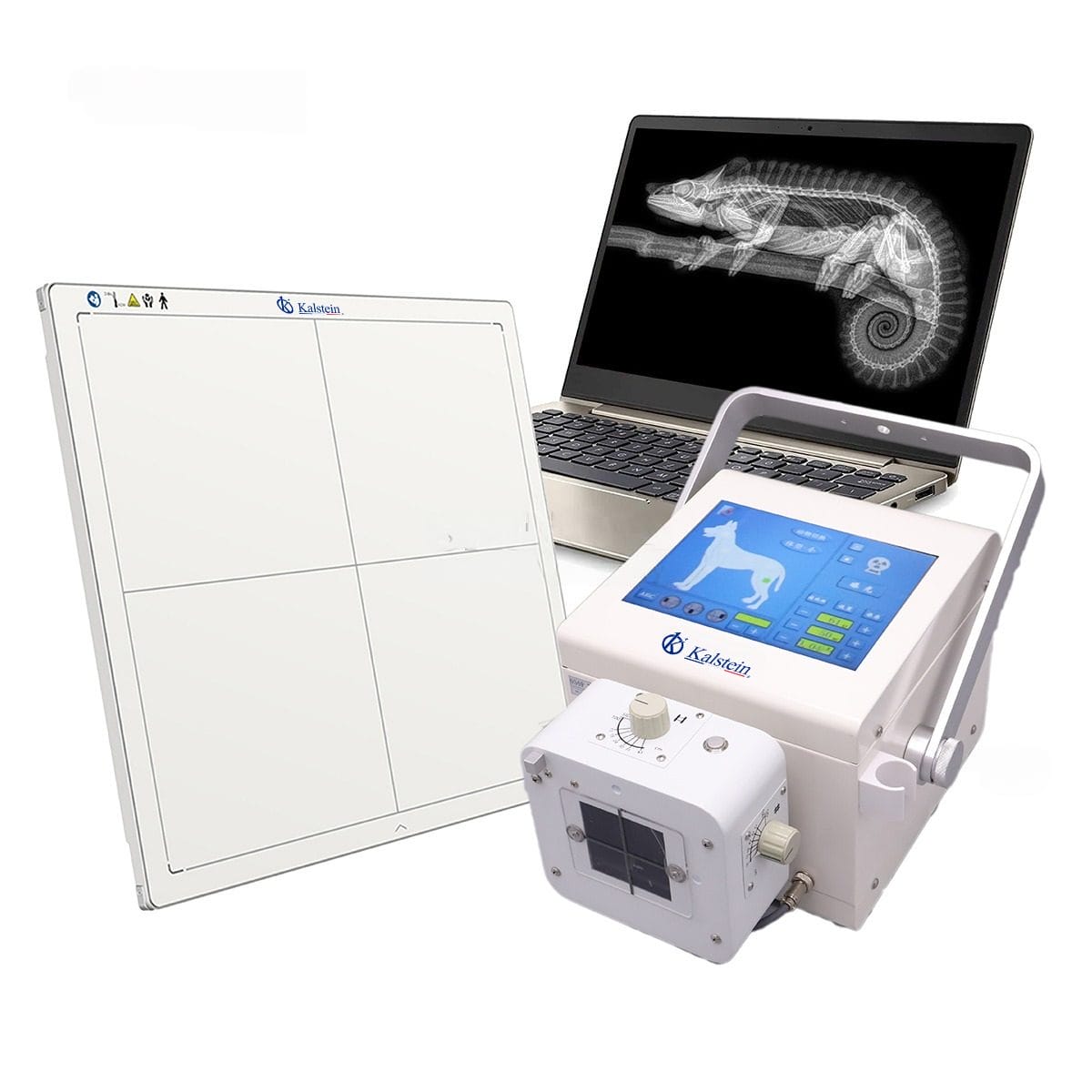
Installation and Commissioning Guide for the YR06160 Portable Digital Veterinary X-Ray
The YR06160 Portable Digital Veterinary X-Ray is a cutting-edge piece of equipment designed for veterinary applications. This guide aims to provide a detailed overview of the installation and commissioning process, ensuring that users can set up the device efficiently and effectively.
Unboxing Checklist
Before you begin the installation, it's crucial to ensure that all components are present and in good condition. The unboxing checklist includes:
- YR06160 Portable Digital X-Ray unit
- 10.4-inch touch screen
- Power supply unit
- Wireless flat panel detector
- User manual and installation guide
- Remote control
- Calibration tools
Site Preparation
Before installation, ensure that the site meets the necessary requirements:
- Temperature range: 10°C to 35°C
- Humidity: 30% to 70% RH
- Voltage: AC 220V±10%, 50Hz±1Hz
- Sufficient ventilation to prevent overheating
- Clear space around the device for operation and maintenance
Anchoring and Leveling the YR06160
Proper anchoring and leveling are essential for the optimal performance of the YR06160. Follow these steps:
- Place the unit on a flat, stable surface.
- Use a leveling tool to check that the unit is perfectly level.
- Secure the unit with appropriate anchors if necessary, especially in mobile setups.
Power-Up Sequence
Once the unit is in place, follow the power-up sequence:
- Connect the power supply to the unit.
- Press the power button on the touch screen.
- Allow the system to initialize and perform self-diagnosis automatically.
- Check for any error codes displayed on the screen.
Calibration and First-Run Setup
Calibrating the YR06160 is crucial for accurate readings. The first-run setup should include:
- Selecting the desired anatomical memory pattern (48 options available).
- Setting tube voltage (kV) range from 40 to 110 kV.
- Calibrating the current (mA range of 20 to 100 mA).
- Testing various exposure times from 40 ms to 4000 ms.
Common Setup Mistakes and Troubleshooting
During installation, users may encounter several common mistakes:
- Failure to level the unit properly can lead to inaccurate readings.
- Not following the power-up sequence may result in error codes.
- Improper calibration settings can affect image quality.
If issues arise, refer to the troubleshooting guide or reset the system to the factory settings.
Technical Specifications of the YR06160
| Feature | Details |
|---|---|
| Model | YR06160 |
| Power | 5 kW |
| Voltage Range | 40~110 kV |
| Current Range | 20~100 mA |
| Exposure Time | 40 ms~4000 ms |
| Weight | 19 kg |
| Screen Size | 10.4 inch |
| Detector Type | Wireless flat panel |
Frequently Asked Questions
What are the key features of the YR06160 Portable Digital Veterinary X-Ray?
The YR06160 features a 10.4-inch touch screen, auto-diagnosis capabilities, high-precision control of tube voltage and current, and a complete lead-shielded X-ray tube to protect against leaks. It also offers 48 anatomical memory patterns for diverse imaging needs.
How do I perform the initial calibration on the YR06160?
Calibration involves selecting anatomical memory patterns, setting appropriate kV and mA ranges, and performing test exposures to verify settings. Follow the user manual for step-by-step calibration instructions to ensure accurate image capture.
What should I do if the YR06160 displays an error code?
Check the user manual for the specific error code displayed. Common steps include resetting the device, checking connections, and ensuring calibration settings are correct. Refer to troubleshooting sections for detailed solutions.
Can the YR06160 be used in various veterinary settings?
Yes, the YR06160 is versatile and can be used in clinics, mobile veterinary units, and educational facilities for various imaging needs. It adapts well to different operational protocols based on specific user requirements.
What type of maintenance does the YR06160 require?
Regular maintenance includes routine cleaning of the touch screen and detectors, checking calibration settings, and ensuring proper power supply. Schedule periodic professional servicing to maintain optimal performance.
Is training required to operate the YR06160?
While the YR06160 is designed for user-friendliness, training is recommended to familiarize operators with its features and best practices for accurate imaging and maintenance. Consider manufacturer training programs for comprehensive understanding.
How can I request a quote for the YR06160?
You can easily request a quote by contacting our sales team or visiting our dedicated quote request page to get the latest pricing and purchase options for the YR06160.
If you are looking for a fusion of innovation and quality, you have come to the right place. At Kalstein, we offer you the luxury of exploring our exclusive catalog of laboratory equipment. We manufacture every device to the highest standards of excellence. Our intuitive and seamless online purchasing channels are designed for your convenience, securing the most competitive prices. Hesitate no longer — we bring science to life, it is time to become part of our community.