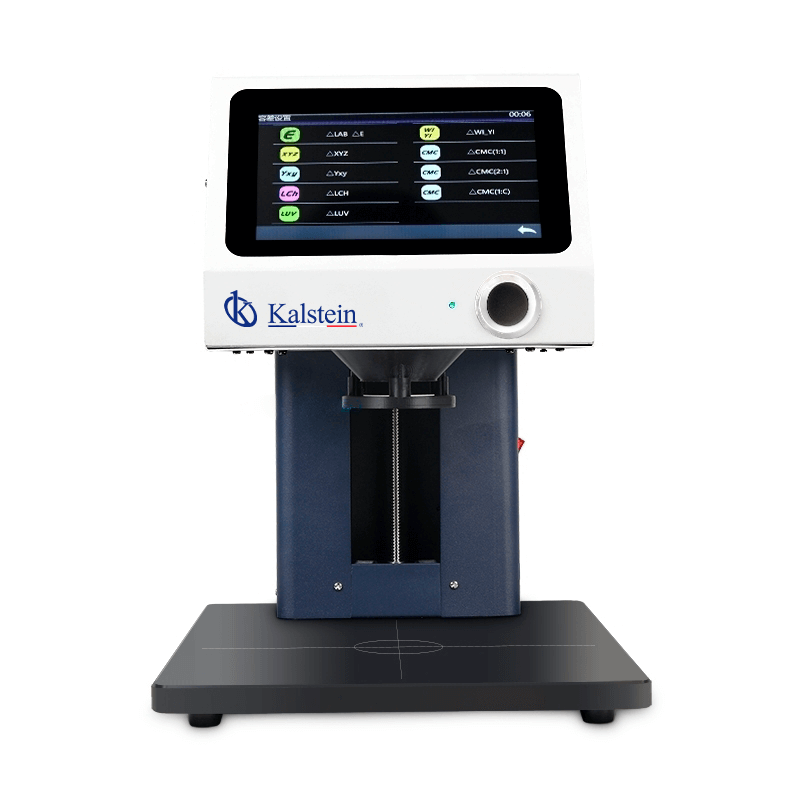
Troubleshooting Common Issues with the YR05483 Non-Contact Spectrophotometer
The YR05483 non-contact spectrophotometer is a versatile instrument designed for precise color measurement across various industries. However, like any sophisticated piece of laboratory equipment, users may encounter issues that require troubleshooting. This guide aims to address common symptoms, their probable causes, and the steps to resolve these issues effectively.
Understanding the YR05483 Spectrophotometer
The YR05483 spectrophotometer features a 45/0 geometry for non-contact color measurement, making it ideal for analyzing liquids, powders, and pastes without contamination risk. It is widely utilized in R&D labs, quality control in production lines, and a variety of industries such as cosmetics, food, and textiles. Understanding how this device operates is crucial for effective troubleshooting.
Technical Specifications of YR05483
| Feature | Description |
|---|---|
| Model | YR05483 |
| Illumination System | 45/0 method (ring illumination, vertical viewing) |
| Light Source | Full spectrum LED light |
| Measuring Aperture | Φ20mm |
| Measurement Distance | 7.5 mm |
| Wavelength Range | 400~700 nm |
| Data Storage Capacity | 30,000 samples (sample mode), 10,000 samples (continuous statistical mode) |
Troubleshooting by Symptom
In this section, we categorize common problems you may encounter while operating the YR05483 into symptoms, with probable causes and effective solutions.
Equipment Does Not Power On
This issue can stem from several potential causes:
- Cause: Faulty power supply or connection.
- Cause: Hardware malfunction or internal disconnect.
- Cause: Blown fuse due to power surge.
Solution: Check the power cables and connections for any loose or damaged parts. Replace any blown fuses and ensure the power outlet is functional.
Error Code E-03
This error code often indicates a problem with the measurement head.
- Cause: Obstruction in the optical path.
- Cause: Calibration error or misalignment.
Solution: Inspect the measurement head for any obstructions and clean it if necessary. Recalibrate the device following the manufacturer’s guidelines.
Inconsistent Readings
Inconsistent measurement results can be frustrating and may arise from multiple factors:
- Cause: Sample contamination.
- Cause: Incorrect measurement distance.
- Cause: Environmental factors (temperature, humidity).
Solution: Ensure that samples are free from contaminants and are prepared according to protocols. Verify the measurement distance and conduct tests in a controlled environment.
Frequent Error Messages
Receiving error messages can disrupt workflow significantly.
- Cause: Software glitches or outdated firmware.
- Cause: Hardware malfunctions.
Solution: Update the software or firmware to the latest version. If problems persist, consult your service provider for potential hardware repairs.
Symptom-Cause-Solution Matrix
| Symptom | Probable Cause | Solution |
|---|---|---|
| Equipment does not power on | Faulty power supply | Check cables and replace fuses |
| Error code E-03 | Obstruction in optical path | Inspect and clean measurement head |
| Inconsistent readings | Sample contamination | Ensure clean samples and correct distance |
| Frequent error messages | Software glitches | Update software and contact support |
Frequently Asked Questions
What are the common issues faced with the YR05483, and how can they be resolved?
Common issues include power failures, error codes, inconsistent readings, and frequent error messages. These can usually be resolved by checking connections, recalibrating the device, or updating the software.
How do I calibrate the YR05483 spectrophotometer?
Calibration involves using a standard calibration plate and following the procedures outlined in the user manual. Ensure to perform calibration regularly to maintain accuracy.
What should I do if the measurement display is unclear?
If the display is unclear, check for any dirt or obstruction on the display screen. Cleaning the screen with a soft, lint-free cloth can often resolve this issue.
Is it possible to use the YR05483 in high humidity conditions?
The YR05483 is designed to operate in specific environmental conditions. It is recommended to maintain humidity levels between 0-85% without condensation to ensure optimal performance.
How frequently should maintenance be performed on the YR05483?
Regular maintenance should occur based on usage frequency and environmental conditions, typically every 6 months, to ensure reliable operation.
Where can I obtain replacement parts for the YR05483?
Replacement parts can be sourced through official distributors or directly from the manufacturer. Always ensure compatibility with the YR05483 model when ordering parts.
What additional accessories are recommended for the YR05483?
Recommended accessories include calibration standards, cleaning kits, and software for enhanced data analysis capabilities.
If you are looking for a fusion of innovation and quality, you have come to the right place. At Kalstein, we offer you the luxury of exploring our exclusive catalog of laboratory equipment. We manufacture every device to the highest standards of excellence. Our intuitive and seamless online purchasing channels are designed for your convenience, securing the most competitive prices. Hesitate no longer — we bring science to life, it is time to become part of our community.